
ERP Data to Business Intelligence
Building reliable Business Intelligence solutions by connecting ERP systems, business processes, and analytical models.
Integrating SAP Business One and Other Business Systems
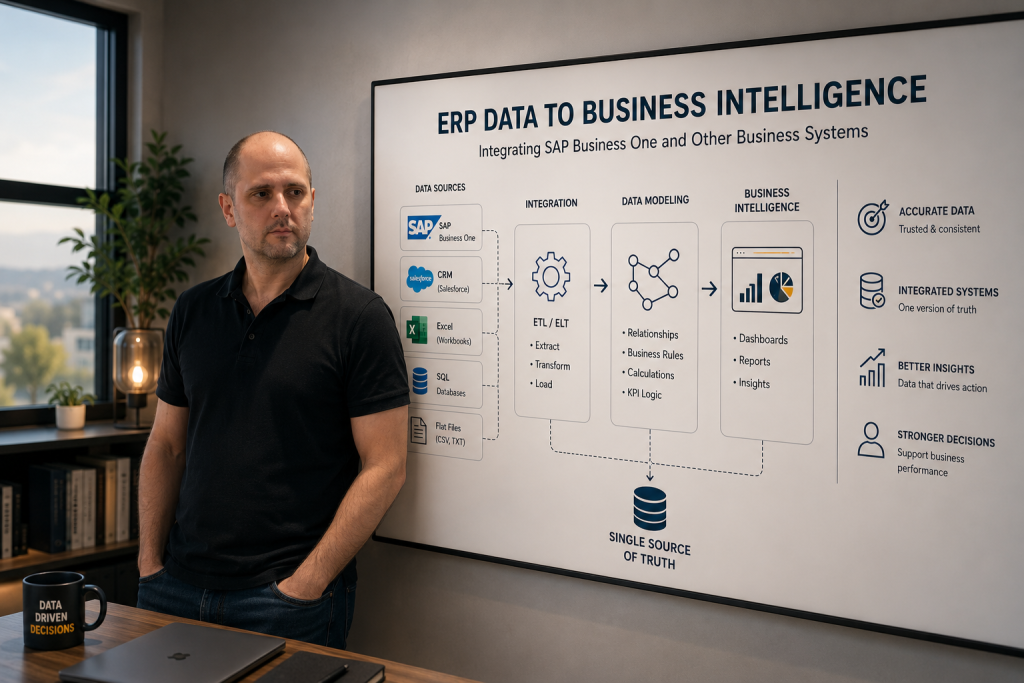
Business Intelligence projects rarely begin inside Power BI.
They begin where business data is created.
Sales orders, purchase invoices, inventory transactions, production records, customer interactions, and financial postings all originate in operational business systems.
The quality of Business Intelligence depends largely on how successfully these systems are transformed into a reliable analytical environment.
Throughout my career, I have worked extensively with ERP, CRM, and financial systems, helping organizations convert operational data into meaningful business insights.
Power BI may be the final destination—but it is only one part of the journey.
Understanding the Entire Data Flow
One of the biggest challenges in Business Intelligence is connecting multiple systems that were never designed to work together.
A typical reporting environment may include:
- SAP Business One
- CRM platforms such as Salesforce
- Excel workbooks maintained by business users
- SQL Server databases
- External financial or operational systems
- CSV and flat file imports
Each source contains valuable information, but each follows different structures, naming conventions, and business rules. The objective is to transform these isolated data sources into a single version of the truth.
SAP Business One as the Foundation
SAP Business One stores an enormous amount of business information. Financial transactions, purchasing, sales, inventory management, production, business partners, projects, and fixed assets all contribute to the organization’s operational picture.
However, extracting meaningful information requires more than simply querying database tables. Understanding relationships between documents, master data, journal entries, inventory movements, and financial dimensions is essential.
Business Intelligence developers who understand the business processes behind the ERP system can design reports that accurately reflect how the company operates.
The Importance of SQL
SQL remains one of the most valuable skills in Business Intelligence. While modern BI platforms offer powerful transformation capabilities, efficient SQL queries often provide the fastest and most reliable method for retrieving business data.
SQL enables developers to:
- Combine multiple ERP tables
- Filter unnecessary records
- Improve performance
- Validate business logic
- Prepare clean datasets for reporting
Strong SQL skills reduce complexity further down the reporting pipeline.
Integrating Multiple Business Systems
Very few organizations rely on a single application. Finance may work in an ERP. Sales teams may use a CRM. Operations may maintain planning spreadsheets.
HR data may come from another platform entirely. The role of Business Intelligence is to integrate these separate systems into one analytical model.
Successful integration requires more than technical connectivity.
It requires understanding how business entities relate across different applications.
For example:
- Customers should have consistent identifiers.
- Products should follow common definitions.
- Financial periods should align across systems.
- Currency conversion rules should remain consistent.
- KPIs should produce identical results regardless of source.
Without this consistency, reporting quickly loses credibility.
Why Data Modeling Matters
Data integration alone does not create useful reporting. Raw operational data is rarely optimized for analytics.
This is where data modeling becomes essential.
A well-designed semantic model:
- Simplifies complex business relationships
- Improves report performance
- Enables reusable calculations
- Supports consistent KPI definitions
- Makes self-service reporting possible
The goal is not simply to organize tables. The goal is to represent how the business actually works.
From Operational Data to Executive Reporting
Once data has been integrated and modeled, it becomes possible to build reporting solutions that serve different audiences. Operational teams may require detailed transaction reports.
Finance departments need profitability analysis, budgeting, and financial statements. Executives typically require high-level KPI dashboards with drill-through capabilities.
Because all reports are built on the same underlying model, every stakeholder works from consistent and trusted information.
Common Challenges
Most ERP reporting projects encounter similar issues:
- Inconsistent master data
- Duplicate business entities
- Manual Excel processes
- Poor documentation
- Different KPI definitions across departments
- Performance bottlenecks caused by inefficient queries
Addressing these challenges requires both technical expertise and business understanding.
Technology alone is rarely enough.
Final Thoughts
Business Intelligence is much more than building dashboards.
Successful BI solutions begin with understanding business processes, continue through data extraction, integration, transformation, and modeling, and ultimately deliver information that supports better decision-making.
Power BI is where business users experience the final result.
The real work begins much earlier—inside ERP systems, databases, and the business processes that generate the data.
The professionals who understand this complete journey are the ones who build reporting solutions that organizations can truly rely on.